HIPAA-Compliant AWS Infrastructure: The Reference Architecture for Healthcare Applications
AWS provides the building blocks for HIPAA-compliant infrastructure, including VPCs, encrypted RDS, CloudTrail, and GuardDuty. Knowing which services to use and how to configure them is the difference between infrastructure that passes a HIPAA audit and infrastructure that only appears to be compliant.
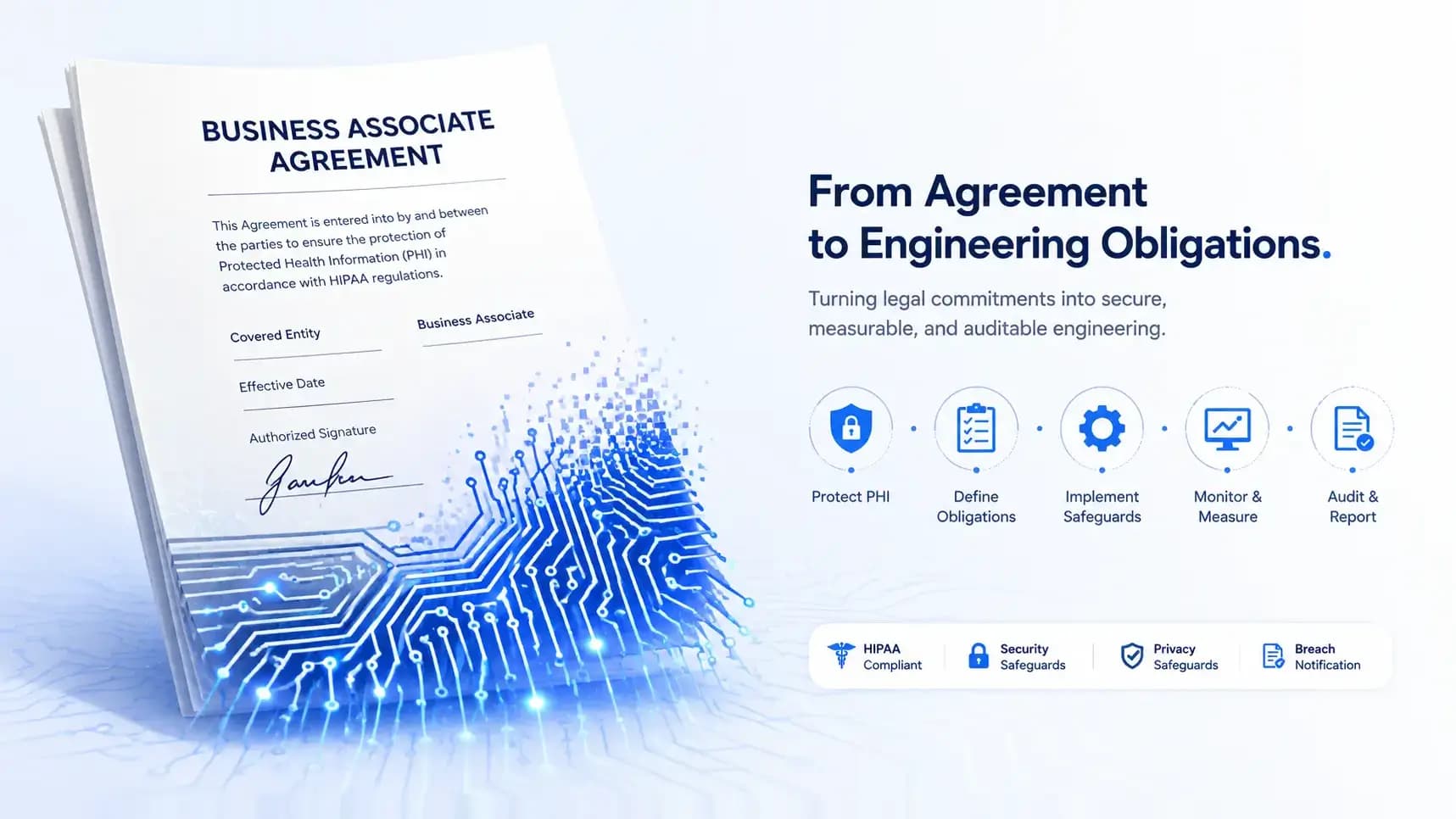
AWS signs Business Associate Agreements (BAAs) for a specific set of services. That list covers most of what you need for a healthcare application. But signing a BAA and building compliant infrastructure are different things; a BAA means AWS is contractually obligated to protect ePHI in their environment; it does not mean your configuration of their services is compliant. That is your responsibility.
This post is the reference architecture we use for HIPAA-compliant healthcare applications on AWS, covering the services, configurations, and monitoring setup that together constitute a defensible infrastructure design.
Network architecture
VPC design
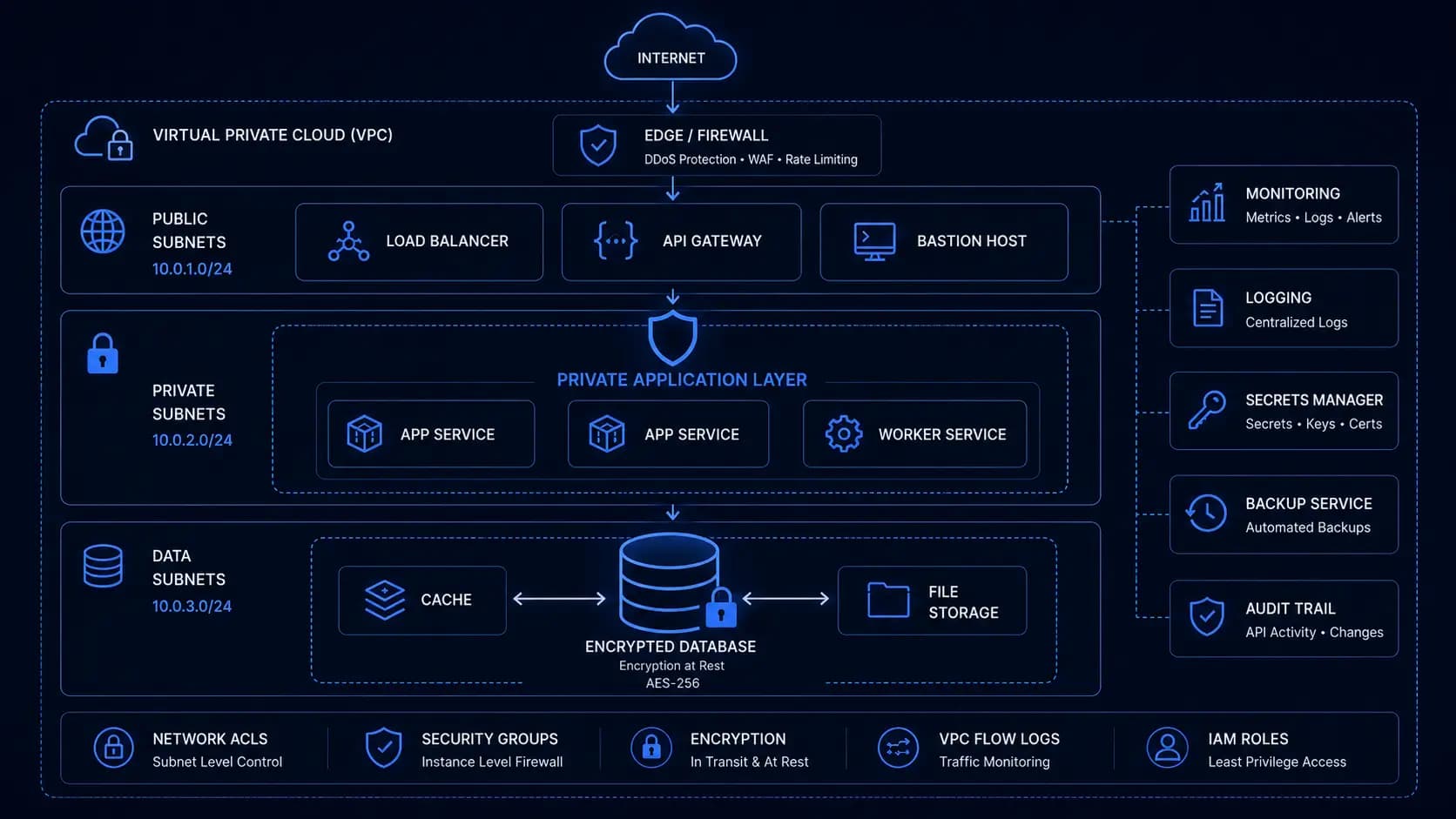
The foundational HIPAA-relevant network decision: no ePHI systems should be in a public subnet. The VPC architecture:
VPC (10.0.0.0/16)

├── Public subnets (10.0.0.0/24, 10.0.1.0/24)

│   └── Application Load Balancer (receives HTTPS from internet)

│   └── NAT Gateways (outbound internet for private subnet resources)

├── Private application subnets (10.0.10.0/24, 10.0.11.0/24)

│   └── ECS tasks / EC2 instances running the application

│   └── Lambda functions handling ePHI

└── Private data subnets (10.0.20.0/24, 10.0.21.0/24)

    └── RDS instances (encrypted)

    └── ElastiCache (if used for session state, no ePHI in cache)
Application servers in private subnets can initiate outbound connections (for API calls, dependency updates, etc.) through the NAT Gateway, but they cannot be reached from the internet directly. Only the ALB, in the public subnet, accepts inbound traffic, and it only forwards HTTPS traffic to the application layer.
Security groups
Security groups enforce the network-level access control. The principle: only allow the minimum necessary traffic.
# ALB security group: accepts HTTPS from anywhere, health check from Route 53

resource "aws_security_group" "alb" {

  name        = "healthcare-alb"

  description = "ALB accepts HTTPS from internet"

  vpc_id      = aws_vpc.main.id


  ingress {

    from_port   = 443

    to_port     = 443

    protocol    = "tcp"

    cidr_blocks = ["0.0.0.0/0"]

  }


  egress {

    from_port       = 8080

    to_port         = 8080

    protocol        = "tcp"

    security_groups = [aws_security_group.app.id]

  }

}


# App security group: accepts from ALB only, talks to RDS

resource "aws_security_group" "app" {

  name   = "healthcare-app"

  vpc_id = aws_vpc.main.id


  ingress {

    from_port       = 8080

    to_port         = 8080

    protocol        = "tcp"

    security_groups = [aws_security_group.alb.id]

  }


  egress {

    from_port       = 5432

    to_port         = 5432

    protocol        = "tcp"

    security_groups = [aws_security_group.rds.id]

  }


  egress {

    from_port   = 443

    to_port     = 443

    protocol    = "tcp"

    cidr_blocks = ["0.0.0.0/0"]   # for calls to external APIs (AWS services, etc.)

  }

}


# RDS security group: accepts only from app layer

resource "aws_security_group" "rds" {

  name   = "healthcare-rds"

  vpc_id = aws_vpc.main.id


  ingress {

    from_port       = 5432

    to_port         = 5432

    protocol        = "tcp"

    security_groups = [aws_security_group.app.id]

  }

}
Database: RDS with encryption
resource "aws_db_instance" "main" {

  identifier        = "healthcare-db"

  engine            = "postgres"

  engine_version    = "15.4"

  instance_class    = "db.t3.medium"

  allocated_storage = 100

  storage_type      = "gp3"


  # HIPAA-required: encryption at rest

  storage_encrypted = true

  kms_key_id        = aws_kms_key.rds.arn


  # HIPAA-required: automated backups for recovery

  backup_retention_period = 7

  backup_window           = "03:00-04:00"


  # Multi-AZ for high availability

  multi_az = true


  # No public access, private subnet only

  publicly_accessible    = false

  db_subnet_group_name   = aws_db_subnet_group.main.name

  vpc_security_group_ids = [aws_security_group.rds.id]


  # Enable Performance Insights for operational visibility

  performance_insights_enabled = true


  # Enable deletion protection

  deletion_protection = true


  # Enable enhanced monitoring

  monitoring_interval = 60

  monitoring_role_arn = aws_iam_role.rds_monitoring.arn

}
S3 for ePHI storage
resource "aws_s3_bucket" "phi_documents" {

  bucket = "healthcare-phi-documents-\${var.environment}"

}


resource "aws_s3_bucket_server_side_encryption_configuration" "phi_documents" {

  bucket = aws_s3_bucket.phi_documents.id


  rule {

    apply_server_side_encryption_by_default {

      sse_algorithm     = "aws:kms"

      kms_master_key_id = aws_kms_key.s3.arn

    }

    bucket_key_enabled = true

  }

}


resource "aws_s3_bucket_versioning" "phi_documents" {

  bucket = aws_s3_bucket.phi_documents.id

  versioning_configuration { status = "Enabled" }

}


resource "aws_s3_bucket_public_access_block" "phi_documents" {

  bucket = aws_s3_bucket.phi_documents.id

  block_public_acls        = true

  block_public_policy      = true

  ignore_public_acls       = true

  restrict_public_buckets = true

}


# Lifecycle policy, transition to Glacier after 90 days, retain 7 years

resource "aws_s3_bucket_lifecycle_configuration" "phi_documents" {

  bucket = aws_s3_bucket.phi_documents.id


  rule {

    id     = "phi-retention"

    status = "Enabled"


    transition {

      days          = 90

      storage_class = "GLACIER"

    }


    expiration {

      days = 2555  # 7 years

    }

  }

}
KMS key management
Separate KMS keys for each service that handles ePHI. Separate keys mean that a compromised application key does not expose the database encryption key, and you can rotate keys independently.
resource "aws_kms_key" "rds" {

  description             = "RDS encryption key for ePHI database"

  deletion_window_in_days = 30


  policy = jsonencode({

    Version = "2012-10-17"

    Statement = [

      {

        Effect    = "Allow"

        Principal = { AWS = "arn:aws:iam::\${var.account_id}:root" }

        Action    = "kms:*"

        Resource  = "*"

      },

      {

        Effect    = "Allow"

        Principal = { AWS = aws_iam_role.app.arn }

        Action    = ["kms:Decrypt", "kms:GenerateDataKey"]

        Resource  = "*"

        Condition = {

          StringEquals = { "kms:ViaService" = "rds.us-east-1.amazonaws.com" }

        }

      }

    }

  })

}


resource "aws_kms_key_rotation" "rds" {

  key_id              = aws_kms_key.rds.id

  rotation_period_in_days = 365

}
CloudTrail: the HIPAA audit log for AWS API activity
CloudTrail records every AWS API call, who did what to which resource and when. For HIPAA, this covers the infrastructure-level audit trail: who modified security groups, who changed bucket policies, or who accessed the KMS keys.
resource "aws_cloudtrail" "main" {

  name                          = "healthcare-audit-trail"

  s3_bucket_name                = aws_s3_bucket.cloudtrail_logs.id

  include_global_service_events = true

  is_multi_region_trail         = true

  enable_log_file_validation    = true   # detects log tampering


  event_selector {

    read_write_type           = "All"

    include_management_events = true


    data_resource {

      type   = "AWS::S3::Object"

      values = ["arn:aws:s3:::healthcare-phi-documents-\${var.environment}/"]

    }


    data_resource {

      type   = "AWS::Lambda::Function"

      values = ["arn:aws:lambda"]

    }

  }


  # Encrypt CloudTrail logs at rest

  kms_key_id = aws_kms_key.cloudtrail.arn


  cloud_watch_logs_group_arn = "\${aws_cloudwatch_log_group.cloudtrail.arn}:*"

  cloud_watch_logs_role_arn  = aws_iam_role.cloudtrail_cloudwatch.arn

}
GuardDuty and Security Hub
GuardDuty provides threat detection, it analyzes VPC Flow Logs, DNS logs, and CloudTrail events to identify suspicious activity like unusual API calls, cryptocurrency mining, or exfiltration attempts. Security Hub aggregates findings from GuardDuty, Inspector, and Config into a centralized security posture view.
resource "aws_guardduty_detector" "main" {

  enable = true


  datasources {

    s3_logs { enable = true }

    kubernetes { audit_logs { enable = false } }

    malware_protection { scan_ec2_instance_with_findings { ebs_volumes { enable = true } } }

  }

}


resource "aws_securityhub_account" "main" {}


resource "aws_securityhub_standards_subscription" "hipaa" {

  standards_arn = "arn:aws:securityhub:::ruleset/hipaa-security-standard/v/1.0.0"

}
CloudWatch alarms for HIPAA-relevant events
HIPAA's audit controls require examining activity, not just recording it. CloudWatch alarms notify the security team of potentially significant events:
locals {

  security_alarms = {

    root_account_usage = {

      filter_pattern  = "{ $.userIdentity.type = \"Root\" && $.userIdentity.invokedBy NOT EXISTS && $.eventType != \"AwsServiceEvent\" }"

      alarm_name      = "RootAccountUsage"

      alarm_desc      = "Root account was used, investigate immediately"

    }

    console_signin_failures = {

      filter_pattern  = "{ ($.eventName = ConsoleLogin) && ($.errorMessage = \"Failed authentication\") }"

      alarm_name      = "ConsoleLoginFailures"

      alarm_desc      = "Multiple console login failures, potential brute force"

    }

    security_group_changes = {

      filter_pattern  = "{ ($.eventName = AuthorizeSecurityGroupIngress) || ($.eventName = AuthorizeSecurityGroupEgress) || ($.eventName = RevokeSecurityGroupIngress) || ($.eventName = RevokeSecurityGroupEgress) }"

      alarm_name      = "SecurityGroupChanges"

      alarm_desc      = "Security group rule changed, verify this was authorized"

    }

    s3_bucket_policy_changes = {

      filter_pattern  = "{ ($.eventSource = s3.amazonaws.com) && (($.eventName = PutBucketAcl) || ($.eventName = PutBucketPolicy) || ($.eventName = PutBucketCors) || ($.eventName = PutBucketLifecycle) || ($.eventName = PutBucketReplication) || ($.eventName = DeleteBucketPolicy) || ($.eventName = DeleteBucketCors) || ($.eventName = DeleteBucketLifecycle) || ($.eventName = DeleteBucketReplication)) }"

      alarm_name      = "S3BucketPolicyChanges"

      alarm_desc      = "S3 bucket policy modified, verify this was authorized"

    }

  }

}
IAM least-privilege
IAM role permissions for the application service, the minimum required to run:
resource "aws_iam_role_policy" "app" {

  name = "healthcare-app-policy"

  role = aws_iam_role.app.id


  policy = jsonencode({

    Version = "2012-10-17"

    Statement = [

      {

        Effect   = "Allow"

        Action   = ["s3:GetObject", "s3:PutObject", "s3:DeleteObject"]

        Resource = "\${aws_s3_bucket.phi_documents.arn}/*"

      },

      {

        Effect   = "Allow"

        Action   = ["kms:Decrypt", "kms:GenerateDataKey"]

        Resource = [aws_kms_key.rds.arn, aws_kms_key.s3.arn]

      },

      {

        Effect   = "Allow"

        Action   = ["secretsmanager:GetSecretValue"]

        Resource = "arn:aws:secretsmanager:\${var.region}:\${var.account_id}:secret:healthcare/*"

      },

      {

        Effect   = "Allow"

        Action   = ["ses:SendEmail", "ses:SendRawEmail"]

        Resource = "arn:aws:ses:\${var.region}:\${var.account_id}:identity/*"

        Condition = {

          StringEquals = { "ses:Recipients": ["@\${var.internal_domain}"] }

        }

      }

    ]

  })

}
Notice what is not in this policy: no IAM management permissions, no ability to modify security groups, no ability to access other S3 buckets, and no ability to access KMS keys for other services. The application can only do what it needs to do. This is least-privilege in practice, and it limits the blast radius of an application-level compromise significantly.
Building this infrastructure from scratch takes time to get right, and the details matter for HIPAA compliance. If you are planning a healthcare application on AWS and want a reference architecture review before you start building, we can help you evaluate your design against the requirements that auditors actually check.
Written by

Founder & CEO
Gaurang Ghinaiya is the Founder & CEO of Nexios Technologies. He is passionate about building innovative software solutions that drive business growth. With years of experience in technology leadership, he guides teams toward excellence.