HL7 FHIR vs HL7 v2: A Developer's Complete Guide to Healthcare Interoperability
EMR integration is where most healthcare software projects slow down or fail. HL7 v2 and FHIR are both in production today, often at the same vendor. This is what you need to know before you start building.
If you are building software that needs to exchange clinical data with an Electronic Medical Records system, you will encounter two standards: HL7 v2 and HL7 FHIR. Understanding the difference, knowing which one applies to your integration, and building correctly for each is the difference between a six-week integration and a six-month one.
This guide covers both standards in enough depth to make real architectural decisions. It is written for software developers, not for standards committees.
Why two standards exist
HL7 (Health Level Seven International) has been developing healthcare data standards since 1987. HL7 version 2 (v2) is the older standard; it has been the dominant protocol for clinical messaging in the US and much of the world since the 1990s. FHIR (Fast Healthcare Interoperability Resources, pronounced "fire") is the newer standard, released in 2014 with the explicit goal of being developer-friendly in a way that HL7 v2 was not.
Both are in production today. HL7 v2 is in the vast majority of hospitals and clinical systems because those systems were built or integrated in the 1990s and 2000s. FHIR is in newer systems and is now mandated by the 21st Century Cures Act for certified EHR vendors, which means every major EHR vendor now has a FHIR API alongside their older interfaces.
Which one you use depends on what the specific EMR you are integrating with supports, and what kind of integration you are building.
HL7 v2: what it is and how it works
HL7 v2 is a messaging standard. Messages are sent between systems to report clinical events: a patient is admitted, a lab result is available, or a medication is ordered. The recipient system processes the message and acts on it.
Message structure
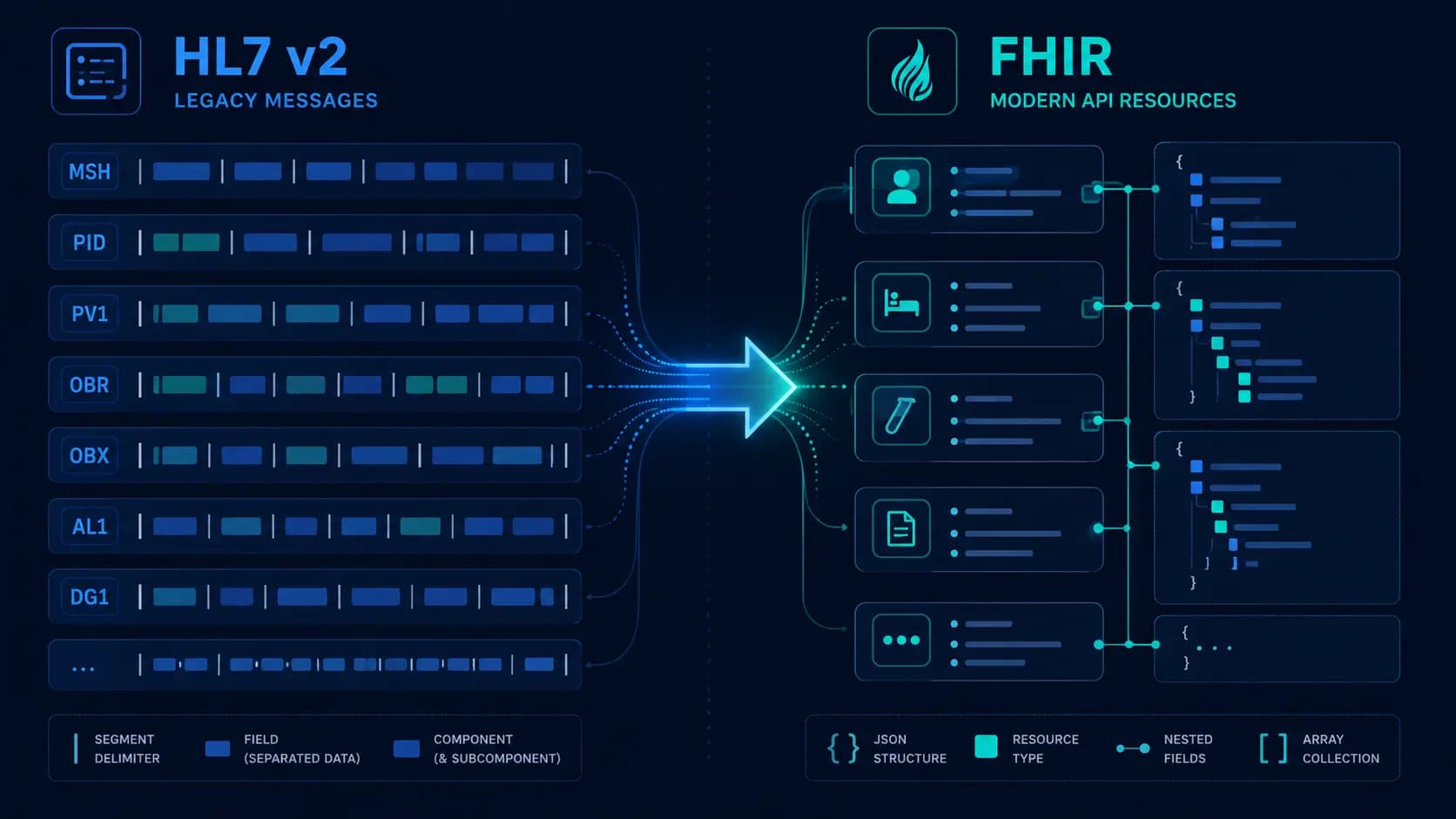
An HL7 v2 message is a pipe-delimited text file. The structure is hierarchical: messages contain segments, segments contain fields, fields contain components, and components contain sub-components. The separator characters are defined in the MSH (Message Header) segment at the start of every message.
A minimal ADT A01 (admit patient) message looks like this:
MSH|^~\&|SENDING_APP|SENDING_FAC|RECEIVING_APP|RECEIVING_FAC|20260601120000||ADT^A01^ADT_A01|MSG00001|P|2.5.1

EVN||20260601120000

PID|1||123456789^^^MRN||Smith^John^A||19800101|M|||123 Main St^^Springfield^IL^62701^USA

PV1|1|I|ICU^101^1|||456^Jones^Robert^^^Dr.||457^Chen^Mary^^^Dr.|MED||||1||||||987654321
Breaking this down:
MSH: Message header. Defines the sending and receiving applications, the message type (ADT^A01), a unique message ID, processing mode (P for production), and the HL7 version.EVN: Event type. Records when the event occurred.PID: Patient identification. Contains the patient's medical record number, name, date of birth, sex, and address.PV1: Patient visit. Contains the visit location (ward, room, bed), the attending and admitting physicians, and the visit number.
Message types and trigger events
HL7 v2 messages are classified by message type and trigger event. The most common in healthcare software integrations:
- ADT (Admit, Discharge, Transfer): A01 (admit), A03 (discharge), A08 (update patient information), A11 (cancel admit), and A13 (cancel discharge). These are the events that tell your application something has changed about a patient's status in the EMR.
- ORM (Order Message): O01 for new orders (lab, radiology, medication). Sent when a clinician places an order in the EMR.
- ORU (Observation Result): R01 for results. Sent when a lab result, radiology reading, or other observation is available.
- MDM (Medical Document Management): T02 for new or revised documents. Used for clinical notes, discharge summaries, and other documents.
- SIU (Scheduling Information Unsolicited): S12 (new appointment), S13 (appointment rescheduled), and S15 (cancel appointment). Used for scheduling system integrations.
MLLP: the transport protocol
HL7 v2 messages are typically transported using MLLP (Minimal Lower Layer Protocol), a lightweight TCP-based protocol that wraps HL7 messages with start and end block characters. MLLP is not HTTP. It is a persistent TCP connection that stays open and passes messages with a specific byte framing:
0x0B [message content] 0x1C 0x0DThe 0x0B (vertical tab) marks the start of a message block. The 0x1C (file separator) followed by 0x0D (carriage return) marks the end. Your MLLP client must frame outgoing messages with these characters and strip them from incoming messages before parsing.
The MLLP receiver returns an ACK (acknowledgment) message. A positive ACK (AA, Application Accept) means the message was received and processed. A negative ACK (AE, Application Error) means processing failed. Your sender must handle NAKs by retrying or routing to a dead letter queue.

What makes HL7 v2 hard
Three things make HL7 v2 integration consistently harder than it looks:
Variability: HL7 v2 is a standard, but it is a flexible one. The specification defines required and optional fields, but what any given EMR actually sends in those fields varies significantly. HCHB sends patient identifiers differently from Epic, which sends them differently from Cerner. You need the specific implementation guide for each EMR you are integrating with, not just the HL7 v2 specification.
Silent failures: An MLLP acknowledgment confirms message delivery at the transport layer. It does not confirm that the receiving system's business logic processed the message correctly, created the right record, or updated the right patient. MDM T02 messages in particular are notorious for being acknowledged successfully while being silently rejected by the EMR's document processing queue. You need end-to-end verification, not just ACK monitoring.
Encoding edge cases: HL7 v2 uses pipe (|) as a field separator and caret (^) as a component separator, but patient data can contain these characters. The escaping rules for HL7 v2 special characters (\F\ for pipe, \S\ for caret) are correct in theory but inconsistently implemented in practice. If a patient's name contains an unusual character, your parser may fail in production after weeks of successful testing with clean data.
FHIR: what it is and how it works
FHIR (Fast Healthcare Interoperability Resources) is a REST API standard. Rather than sending messages about events, FHIR exposes clinical data as resources that can be created, read, updated, and deleted via HTTP. A FHIR server looks, from an API design perspective, much more like a modern web API than HL7 v2.
Resources
Everything in FHIR is a resource. A Patient is a resource. An Appointment is a resource. A Condition, an Observation, a MedicationRequest, or a DiagnosticReport, each is a separate resource type with a defined schema in JSON or XML. The complete list runs to over 140 resource types in FHIR R4 (the current stable version as of 2026).
A Patient resource in JSON looks like this:
{

  "resourceType": "Patient",

  "id": "patient-12345",

  "meta": {

    "versionId": "1",

    "lastUpdated": "2026-06-01T12:00:00Z"

  },

  "identifier": [

    {

      "use": "official",

      "system": "http://hospital.example.org/patients",

      "value": "123456789"

    }

  ],

  "name": [

    {

      "use": "official",

      "family": "Smith",

      "given": ["John", "A"]

    }

  ],

  "birthDate": "1980-01-01",

  "gender": "male"

}
REST API interactions
FHIR defines a standard set of REST interactions:
GET /Patient/123: Read a specific patient by IDGET /Patient?family=Smith&birthdate=1980-01-01: Search for patients matching criteriaPOST /Patient: Create a new patientPUT /Patient/123: Update an existing patientDELETE /Patient/123: Delete a patient (rarely used; most systems use status flags)GET /Patient/123/$everything: Extended operation to get all resources related to a patient
SMART on FHIR
SMART on FHIR is the authorization layer built on top of FHIR. It uses OAuth 2.0 with FHIR-specific scopes (such as patient/Patient.read or user/Observation.write). If you are building an application that accesses a FHIR server on behalf of a patient or clinician, you will implement SMART on FHIR for authentication and authorization.
FHIR versions
FHIR has gone through several versions: DSTU2, STU3, R4, and R4B. R4 is the version mandated by the 21st Century Cures Act for US EHR certifications and is the version you should target for new integrations. R4B is a minor update that adds a small number of new resources. R5 is in development. Check which version the specific system you are integrating with supports, many have R4 APIs but some legacy implementations are still on STU3.
When to use FHIR vs HL7 v2
This is the practical question. Here is how we think about it:
Use HL7 v2 when:
- The EMR you are integrating with only exposes HL7 v2 interfaces (common in home health, smaller hospital systems, and legacy EMRs)
- You need real-time event-driven updates (such as ADT events or lab results as they arrive), HL7 v2 push messaging is well-established for this
- The integration is with older infrastructure that predates FHIR
Use FHIR when:
- The EMR supports FHIR R4 (Epic, Cerner, Athenahealth, and most major modern systems do)
- You need to query patient data on demand rather than receiving push messages
- You are building a patient-facing application (SMART on FHIR is well-suited for patient-access use cases)
- You need access to a wide range of resource types and do not want to map pipe-delimited HL7 v2
Use both when:
- The EMR exposes both interfaces and you need event-driven updates (HL7 v2 push) as well as on-demand queries (FHIR GET)
- You are building a bidirectional integration, receiving ADT events via HL7 v2 for real-time status updates while querying clinical data via FHIR
In the care coordination platform we built for CareCoordinations, we used both. The HCHB integration used HL7 v2 ADT messages (A01, A03, A08, A11, A13) for patient admission and discharge events because that is what HCHB's interface supports for real-time event streaming. The clinical data queries were handled separately. This is the typical pattern for home health EMR integrations, the event bus is HL7 v2, and anything that requires a structured data query uses whatever API the EMR exposes.

Integration architecture patterns
The integration engine pattern
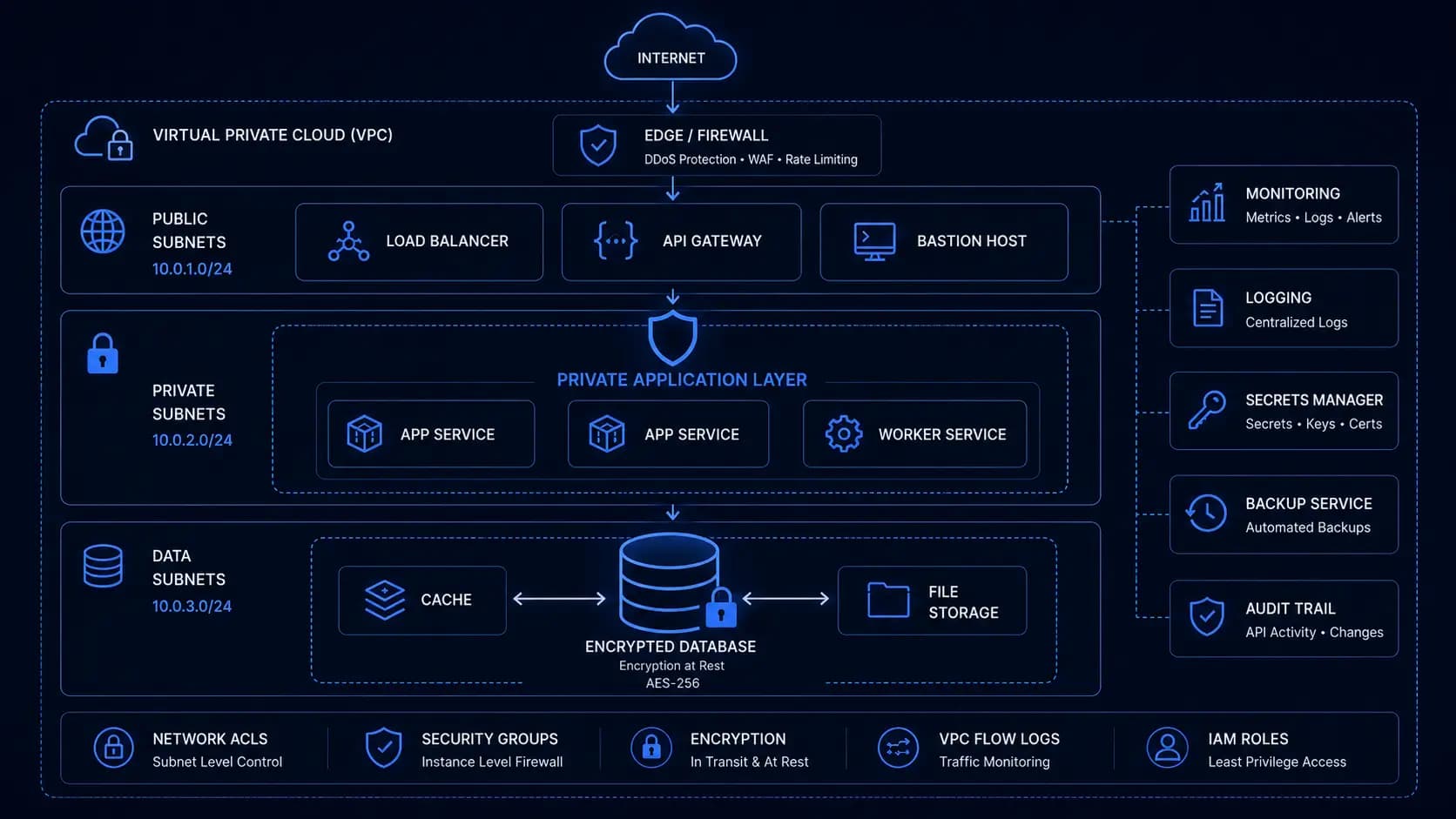
For anything beyond a single point-to-point integration, an integration engine (also called a healthcare integration platform or middleware) is the standard architecture. Mirth Connect is the most common open-source option; Rhapsody, HL7 Soup, and Iguana are commercial alternatives. The integration engine acts as a message broker: it receives HL7 v2 messages from EMR systems, transforms them to your internal format, routes them to the right destination, and handles acknowledgments.
Without an integration engine, every EMR has its own MLLP listener in your application, its own parser, and its own error handling. With an integration engine, the MLLP complexity is centralized and your application receives clean, normalized messages via a webhook or queue.
The event queue pattern
Whether you use an integration engine or build your own MLLP listener, incoming HL7 v2 messages should be queued before processing. A message that arrives and immediately triggers a database write or API call is fragile, if the downstream system is unavailable, the message is lost. Queue messages in SQS or Redis before processing, with dead letter queues for messages that fail processing after retries.
FHIR subscription
FHIR R4 includes a Subscription resource that allows your application to receive notifications when resources change. This is the FHIR equivalent of HL7 v2 push messaging. In practice, FHIR Subscription support varies significantly by vendor, and many implementations prefer polling (GET with _lastUpdated filter) over subscriptions. Check what the specific EMR supports before designing around subscriptions.
Common pitfalls in production
Patient matching: HL7 v2 ADT messages contain a Medical Record Number (MRN) for the patient. Your application has its own patient identifier. Mapping between them reliably, including handling duplicate patients, merged records, and MRN changes, is consistently the most complex part of any EMR integration. Build a patient identity management layer from the start rather than assuming a 1:1 mapping between MRNs and your patient records.
Timezone handling: HL7 v2 timestamps are in the format YYYYMMDDHHMMSS. They may or may not include a timezone offset. If the sending system does not include a timezone, you need to know what timezone that system is in to interpret the timestamp correctly. For US healthcare integrations involving multiple time zones, this is a real source of errors. Store all timestamps in UTC internally and convert only at display time.
Version negotiation: FHIR R4 and STU3 are not backward-compatible. A FHIR R4 client cannot reliably read STU3 resources without mapping. When you are building a FHIR integration, confirm the exact version with the EMR vendor before writing a line of code, and build against a sandbox that runs the same version as production.
Healthcare interoperability is genuinely complex, it is not just an API call. The standards are well-defined but the implementations are variable, and the edge cases in production data are numerous. If you are planning your first EMR integration and have questions about which approach is right for your specific situation, we have done this across multiple systems and can help you scope it correctly from the start.
Written by

Founder & CEO
Gaurang Ghinaiya is the Founder & CEO of Nexios Technologies. He is passionate about building innovative software solutions that drive business growth. With years of experience in technology leadership, he guides teams toward excellence.