Multi-Tenant SaaS Architecture: Isolation Models, Data Strategies, and the Decisions That Scale
The multi-tenancy architecture decision you make when you have 10 customers is the architecture you will live with when you have 10,000. This is the tradeoff analysis for each isolation model and the implementation patterns that hold up at scale.
Multi-tenancy is the defining architectural property of SaaS products. Every other design decision, database schema, deployment model, access control, billing, and analytics, interacts with how you isolate tenant data and compute. Getting this right at the start is not premature optimization; it is avoiding a rewrite at an inconvenient moment.
This post covers the three multi-tenancy isolation models, the tradeoffs of each, and the implementation patterns we use for each model in production.
The three isolation models
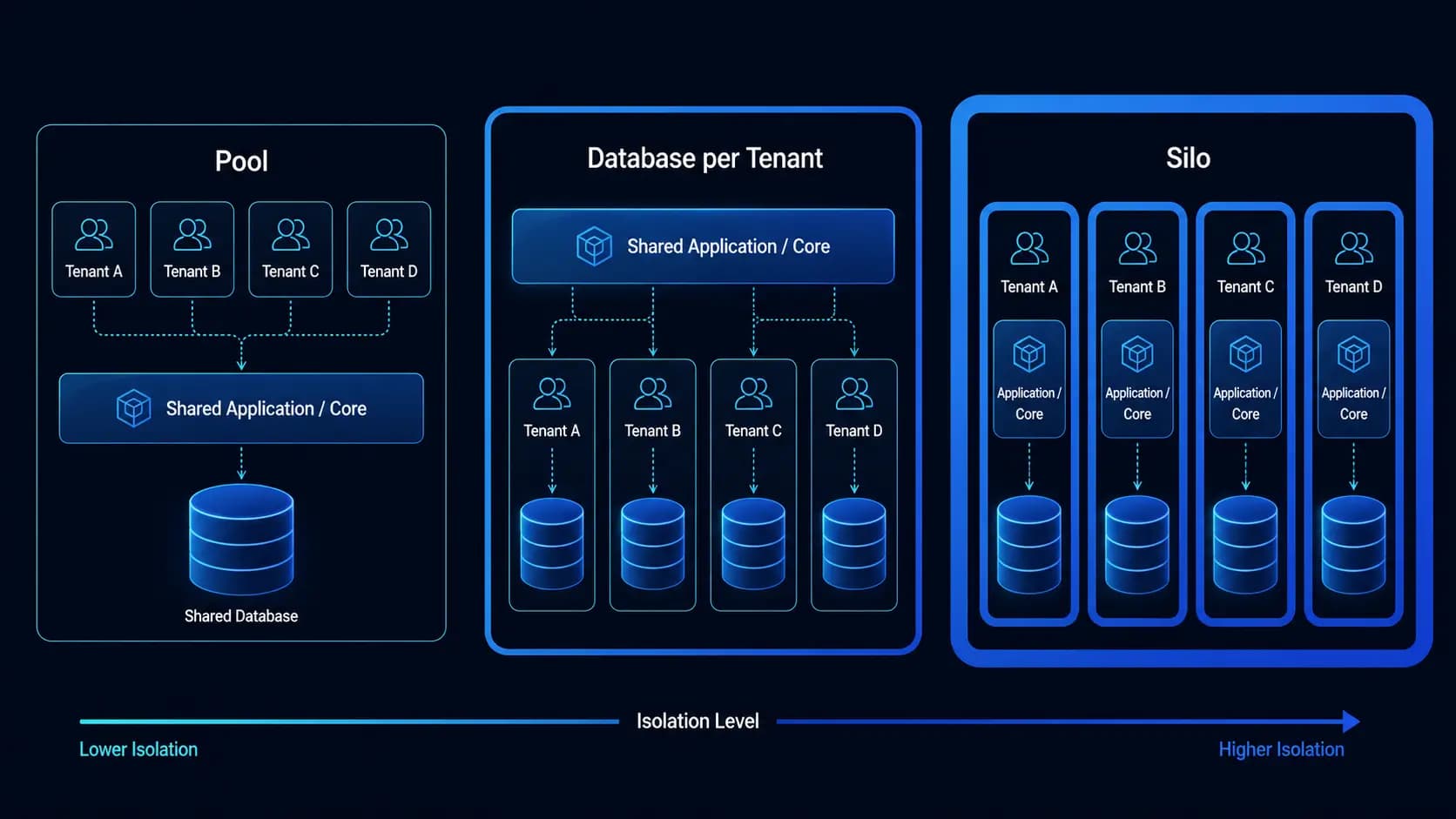
Model 1: Shared everything (pool model)
All tenants share the same database, same application instances, and the same infrastructure. Tenant data is segregated at the application layer by a tenant_id column on every table.
Advantages:
- Lowest operational complexity, one database to manage, one application to deploy
- Most cost-efficient at low scale, no per-tenant infrastructure cost
- Easiest to operate, one set of metrics, one set of alerts, one deployment pipeline
- Schema migrations run once for all tenants simultaneously
Disadvantages:
- Weakest isolation, a bug that bypasses tenant filtering could expose cross-tenant data
- Noisy neighbor problem, one tenant's heavy workload affects all tenants' performance
- Cannot offer tenant-specific performance SLAs
- Compliance challenges, some regulated customers require data to be physically isolated from other tenants
When to use: Early-stage SaaS with many small tenants and uniform usage patterns. Also the right model when all tenants are in the same compliance tier and none require physical isolation.
Model 2: Database per tenant (bridge model)
Each tenant gets their own database (or schema, if using PostgreSQL schema-level isolation). The application is shared, but data is isolated at the database level.
Advantages:
- Strong data isolation, tenant databases are physically separate
- No noisy neighbor for data queries, each tenant's query load is isolated
- Easier to satisfy compliance requirements for data residency and isolation
- Can restore a single tenant's data from backup without affecting others
- Can migrate one tenant's database independently
Disadvantages:
- Schema migrations must run across all tenant databases, this is operationally complex at 1,000 plus tenants
- Database connection pooling is more complex, need a pool per tenant or a proxy that routes to the right database
- Higher cost, more databases to run and maintain
- Harder to run cross-tenant analytics queries
When to use: Mid-market SaaS where tenants are businesses with moderate data volumes and some compliance or contractual requirements for isolation. Also appropriate when significant per-tenant customization is expected.
Model 3: Infrastructure per tenant (silo model)
Each tenant gets their own dedicated application stack, their own application servers, their own database, possibly their own VPC or cloud account. Used only for the highest-tier enterprise customers.
Advantages:
- Complete isolation, a failure in one tenant's infrastructure does not affect others
- Can be deployed in the tenant's own cloud account for complete data sovereignty
- Can offer genuine performance SLAs with dedicated compute
- Satisfies the strictest regulatory and contractual requirements
Disadvantages:
- Highest operational complexity and cost by a wide margin
- Deploying a product update requires updating every tenant stack
- Monitoring requires aggregation across many separate infrastructure stacks
When to use: Enterprise-tier customers who pay for it, in markets (healthcare, finance, government) where physical isolation is a contractual or regulatory requirement.
The hybrid model (what most production SaaS uses)
In practice, most successful SaaS products use a hybrid: pool model for standard tier customers, database-per-tenant for mid-market customers, and infrastructure per tenant for their top enterprise accounts. The application must support all three, which requires abstracting the tenant isolation model from the application code.
// Tenant connection resolver, returns the right database connection

// regardless of the tenant's isolation model

interface TenantConnectionConfig {

  isolationModel: 'pool' | 'schema' | 'database' | 'silo'

  connectionString: string

  schemaName?: string  // for schema-level isolation

}


async function getTenantConnection(tenantId: string): Promise {

  const tenant = await tenantRegistry.get(tenantId)


  switch (tenant.isolationModel) {

    case 'pool':

      return { isolationModel: 'pool', connectionString: SHARED_DB_URL }

    case 'schema':

      return { isolationModel: 'schema', connectionString: SHARED_DB_URL, schemaName: tenant.schemaName }

    case 'database':

      return { isolationModel: 'database', connectionString: tenant.databaseUrl }

    case 'silo':

      return { isolationModel: 'database', connectionString: await getDecryptedConnectionString(tenant.id) }

  }

}
Implementing pool model with bulletproof tenant filtering
The pool model is the most common and the most dangerous if tenant filtering is implemented inconsistently. The pattern that makes it safe: a row-level security approach enforced at the query layer, not just the application layer.

PostgreSQL Row Level Security
-- Enable RLS on every table that contains ePHI or tenant-sensitive data

ALTER TABLE patients ENABLE ROW LEVEL SECURITY;


-- Create a policy that allows each tenant to see only their own rows

CREATE POLICY tenant_isolation ON patients

  USING (tenant_id = current_setting('app.current_tenant_id')::uuid);


-- The application sets this at the connection level

-- This means even if application code forgets to add a tenant_id WHERE clause,

-- the database will enforce the filter

SET LOCAL app.current_tenant_id = '550e8400-e29b-41d4-a716-446655440000';
PostgreSQL RLS provides a safety net that operates at the database level, below the application layer. A query that forgets the tenant filter still returns only the current tenant's data because the database enforces the policy. This is defense in depth for the most critical isolation requirement.
Setting the tenant context in the application
// Middleware that sets the tenant context for every request

async function tenantContextMiddleware(req: Request, res: Response, next: NextFunction) {

  const tenantId = await resolveTenantId(req)  // from subdomain, JWT, or API key

  if (!tenantId) return res.status(401).json({ error: 'Tenant not identified' })


  // Set the database session variable that RLS policies use

  await db.$executeRaw`SET LOCAL app.current_tenant_id = \${tenantId}`


  // Attach to request for application-layer use

  req.tenantId = tenantId

  next()

}
Schema migrations at scale
Running migrations across database-per-tenant deployments is one of the most operationally complex challenges in SaaS. The pattern that works:
// Migration runner for multi-tenant deployments

async function runMigration(migrationPath: string): Promise {

  const tenants = await tenantRegistry.getAllActive()

  const results: { tenantId: string; success: boolean; error?: string }[] = []


  // Run migrations in parallel batches, not all at once (avoid DB connection exhaustion)

  for (const batch of chunk(tenants, MIGRATION_BATCH_SIZE)) {

    await Promise.all(

      batch.map(async (tenant) => {

        try {

          const conn = await getTenantConnection(tenant.id)

          await runMigrationOnConnection(conn, migrationPath)

          results.push({ tenantId: tenant.id, success: true })

        } catch (error) {

          results.push({ tenantId: tenant.id, success: false, error: String(error) })

          // Do not throw, continue with other tenants

        }

      })

    )

  }


  // Report failures, do not silently swallow migration errors

  const failures = results.filter(r => !r.success)

  if (failures.length > 0) {

    await alertOpsTeam('Migration failures', failures)

    throw new Error(`Migration failed for \${failures.length} tenants`)

  }

}
Tenant onboarding automation
Every new tenant requires: tenant record creation, database provisioning (for non-pool model), seed data setup, initial admin user, email configuration, and billing integration. Automating this completely is table stakes for a SaaS product at any scale.
async function provisionNewTenant(params: TenantProvisionParams): Promise {

  const tenant = await db.tenants.create({

    data: {

      id: crypto.randomUUID(),

      name: params.companyName,

      subdomain: params.subdomain,

      plan: params.plan,

      isolationModel: PLAN_ISOLATION_MODEL[params.plan],

      status: 'provisioning',

    }

  })


  // Provision based on isolation model

  if (tenant.isolationModel === 'database') {

    await provisionTenantDatabase(tenant.id)

  } else if (tenant.isolationModel === 'schema') {

    await provisionTenantSchema(tenant.id)

  }


  // Run initial migrations / seed data

  await runMigration(INITIAL_MIGRATION_PATH)


  // Create admin user

  await createTenantAdminUser(tenant.id, params.adminEmail)


  // Set up billing

  await billingProvider.createSubscription({ tenantId: tenant.id, plan: params.plan })


  // Update status

  await db.tenants.update({ where: { id: tenant.id }, data: { status: 'active' } })


  return tenant

}
Observability in multi-tenant systems
Every metric, log entry, and trace in a multi-tenant system should include the tenant ID. Without this, you cannot distinguish "the system is slow" from "one specific tenant is experiencing slowness," which are very different problems with very different solutions.
// Add tenant ID to all logs

logger.info({

  tenantId: req.tenantId,

  userId: req.userId,

  endpoint: req.path,

  latencyMs: Date.now() - req.startTime,

}, 'Request completed')


// Add tenant ID to metrics

metrics.histogram('request_duration_ms', latencyMs, { tenant_id: req.tenantId, endpoint: req.path })
With tenant ID in every metric, you can build dashboards that show per-tenant performance, identify tenants with unusual usage patterns (both for capacity planning and for billing anomaly detection), and give enterprise customers reports of their own SLA performance.
Multi-tenancy architecture is a decision with long-term consequences. The isolation model you choose shapes your database design, deployment pipeline, compliance posture, and enterprise sales motion. Getting it right at the start is significantly easier than migrating later. If you are designing a new SaaS product and want to work through the isolation model decision for your specific market and customer profile, we have done this across multiple products and can help you choose the right model for where you are and where you are going.
Related service
AI Development & Automation
Production RAG pipelines, LLM integrations, and AI workflow automation for healthcare and e-commerce.
Written by

Founder & CEO
Gaurang Ghinaiya is the Founder & CEO of Nexios Technologies. He is passionate about building innovative software solutions that drive business growth. With years of experience in technology leadership, he guides teams toward excellence.